
Gifting that fits the stack you built, and leaves it alone
You wrote the theme, chose the cart drawer, and run a pipeline that reads every order. Wrapped fits into all of it: nothing that has to go into the theme code, a stable handle on every block for the rare case that needs one, and every gift on the order as plain Shopify data.
The theme stays the way you shipped it
Built it from scratch, or customised it past recognition? Gift Blocks are theme app blocks that load with the app embed, so gifting arrives with nothing in the theme code for you to own.
- No snippet to own. The theme's files can stay as shipped. Refactor away: there is no gifting snippet tangled up in it.
- Theme updates on your schedule. Gift Blocks re-attach after theme updates, so the next release needs no gifting checklist. Ship it on a Friday, if you must.
- App blocks where your sections take them. On the product page and the cart page, Gift Blocks go in like any other app block. Where a section takes none, Wrapped places the block itself.
A cart drawer of your own, with a Gift Block in it
Built the drawer yourself? Every storefront Gift Block has three stable handles for exactly that. Most stores never need them: without them, Wrapped places each block itself.
- A class name you choose. The Gift Block renders inside the element that carries it: under each line item, above the checkout button, wherever the design says. Mobile and desktop markup can both carry it.
- A JavaScript event you name. Dispatched on
documentanddocument.documentElementwhen a customer saves or removes gift options. No cart data rides along, so your listener fetches the cart and redraws the drawer your way. - A UUID for your CSS. Each block carries it in its
uuidattribute, so the drawer's Gift Block can go compact while the cart page's keeps its room.
Gift Blocks work in
- The theme's own drawer. Placed for you.
- The most popular cart drawer apps on Shopify. Rebuilt when the drawer mounts late.
- A drawer you built. Placed by the class name you choose.
Shopify's own parts in the cart and at checkout
If you know Shopify, you already know how gifting runs. Each gift option is a real Shopify product, with its own price, inventory, and image, and the cart and checkout run on Shopify's own extension points.
- A cart transform for bundles. Bundled, the gift rides inside its product's line through a Shopify cart transform function. Itemized, it is a line of its own. Either way, the order shows every line to pick.
- A discount function for gift discounts. Gift product discounts apply automatically, sit under Shopify Discounts with the rest, and combine with product, order, and shipping discounts. Nobody types a code.
- At checkout, on Shopify Plus. The checkout Gift Block is a checkout UI extension, placed in Shopify's checkout editor and styled by your checkout branding. Restyle the checkout, and the block follows.
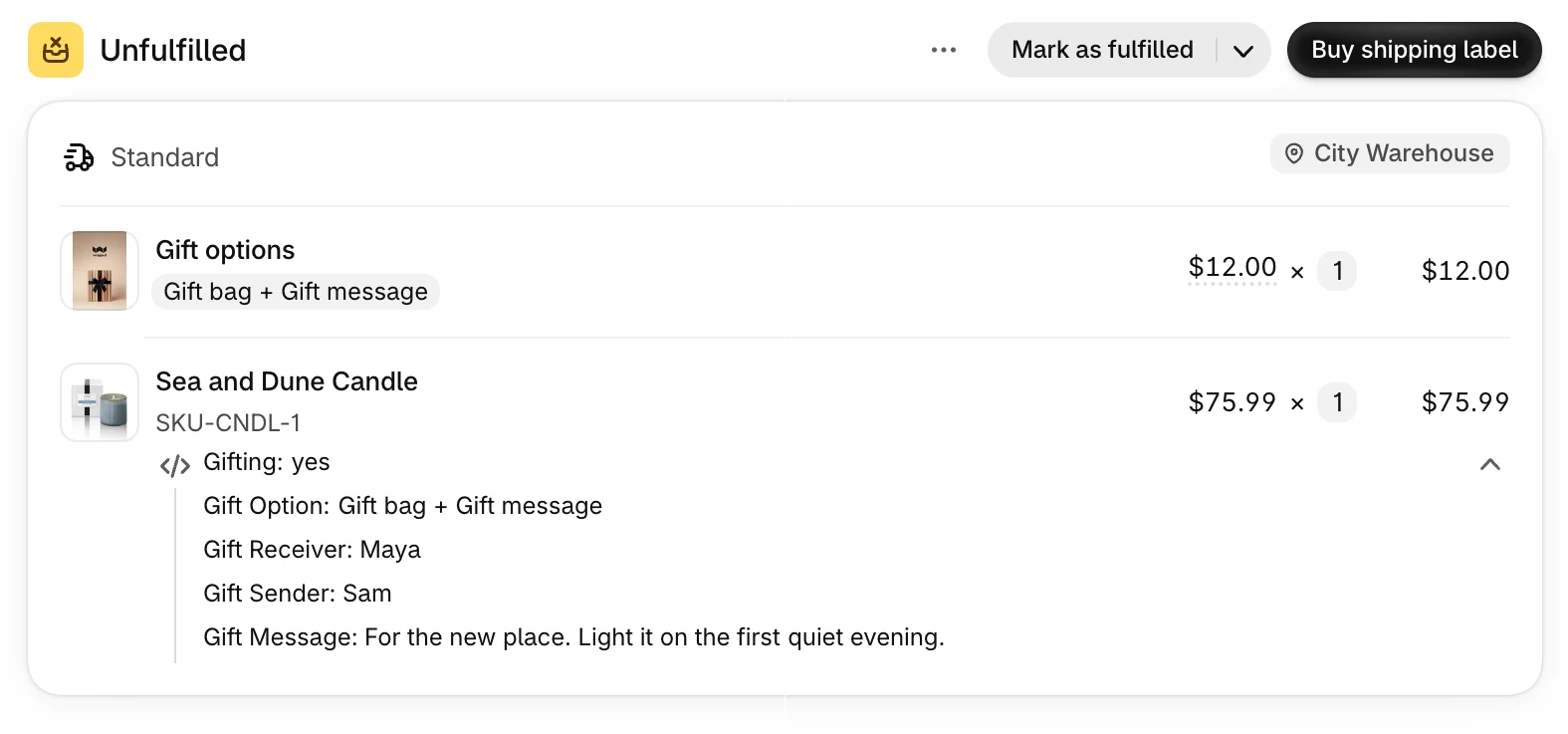
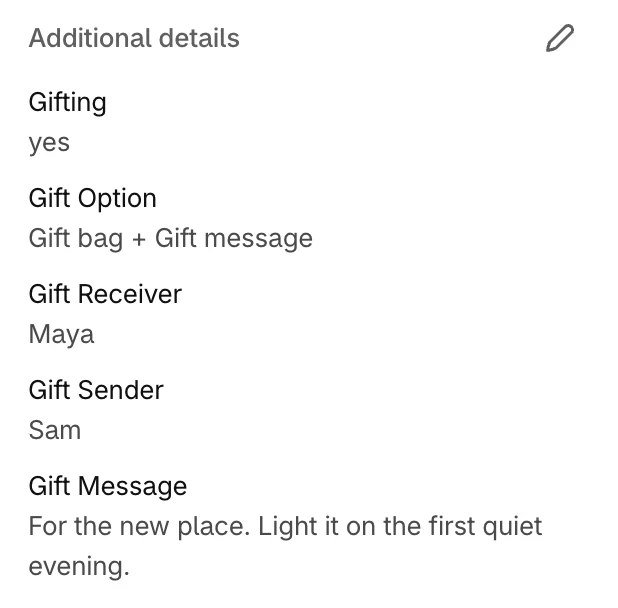
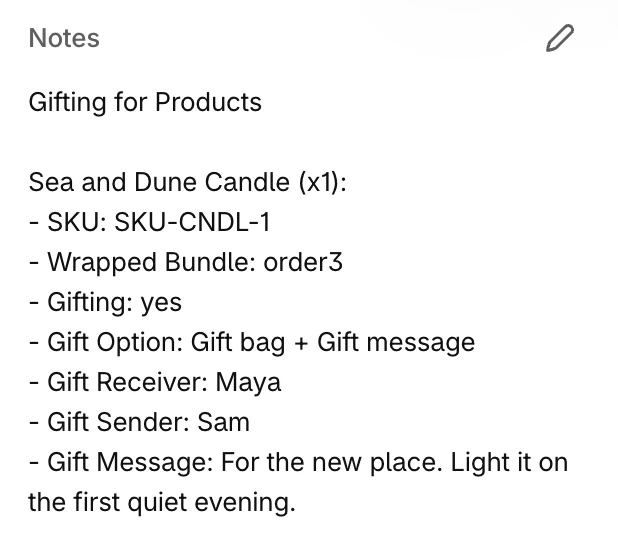
Gift data where your pipeline already looks
Your ERP sync and your 3PL import already read Shopify orders. Gifts arrive in those same places, so there is no new feed to wire up, and nobody retypes a gift message into the warehouse system.
- Line item properties and order attributes. Gift option, To, From, and message, on the gifted line with Gifting for Products and on the order with Gifting for Orders.
- The keys your mapping expects. Attribute names can match your import, and a leading underscore hides one from customers while it stays on the order.
- A summary your parser can find. A gift summary goes in the order note, from a Liquid template, between two — Wrapped Gifting Attributes — lines. The rest of the note is kept.
- A tag that plays well with others. The tag is 🎁 Wrapped or your own, and it merges with the tags already on the order.
Hand over a client store with nothing left to explain
The next developer inherits a theme with no gifting code of ours in it, and the client's team runs gifting from the Shopify admin, with the look you set.
- Ready on a staging theme. Set gifting up on a staging theme, and it is ready the day that theme goes live.
- The client's team runs it. How the block looks and what it says live in the Gifting editor, so turning “Make it a gift” into “Wrap it for the holidays” is their call, not your ticket.
- A handover note the size of a sticky note. If you placed a block by class name, mention the element it points at, since that markup is yours. Everything else lives in the Shopify admin.
Great App, great service, no code in the store. Very easy to install with all required settings in place.
Questions developers ask first
Will the next theme update break gifting?
No. Gift Blocks are theme app blocks that load with the app embed, the theme's files can stay as shipped, and the blocks re-attach after theme updates. The one thing to carry across is markup you added yourself: an element a class name points at needs to be in the new version too.
Can a Gift Block live in a cart drawer I built myself?
Yes. Give an element in the drawer a class name you choose, and the Gift Block renders inside it. With Gifting for Products, put the element inside the line item loop so each item gets its own. Separate mobile and desktop markup can both carry the class name.
Does the JavaScript event carry cart data?
No. Wrapped dispatches the event you name on document and on document.documentElement when a customer saves or removes gift options, and that is all it does. Your listener fetches the cart and runs your own code, for example to redraw a custom drawer without a page reload.
Which parts of a Gift Block can my code rely on?
Three: the class name you choose, the event you name, and the UUID in the block's uuid attribute. The markup inside a Gift Block is not one of them, so build on those three and leave the look to the Gifting editor.
What does an ERP or 3PL import get from a gift order?
Plain Shopify order data. Gift option, To, From, and message are line item properties with Gifting for Products and order attributes with Gifting for Orders, and their names can match your import. A gift summary goes in the order note from a Liquid template, between two — Wrapped Gifting Attributes — lines, and the 🎁 Wrapped tag, or your own, is merged with the order's tags. The properties and attributes are there the moment the order is created. The note summary and the tag follow within a minute or two.
Can I style the checkout Gift Block?
Through checkout branding. On Shopify Plus, the checkout Gift Block is a checkout UI extension, placed in Shopify's checkout editor and styled by the checkout branding you already set, under each item or once for the order.
Gift Blocks that fit your stack and leave it alone
Rated 4.8 on the Shopify App Store. Every feature is on every plan, with a 7-day free trial.