
Gift wrap and messages on the orders your team already packs
Gift options, names, and messages land on the Shopify order, ready for the packing slip apps, 3PL tools, and ERP exports your team already runs. One tag finds the gift orders, and each gift option is a product with its own inventory.
Gift details sit where your tools already look
Customers write the gift message once. The Shopify order carries it to each tool down the line.
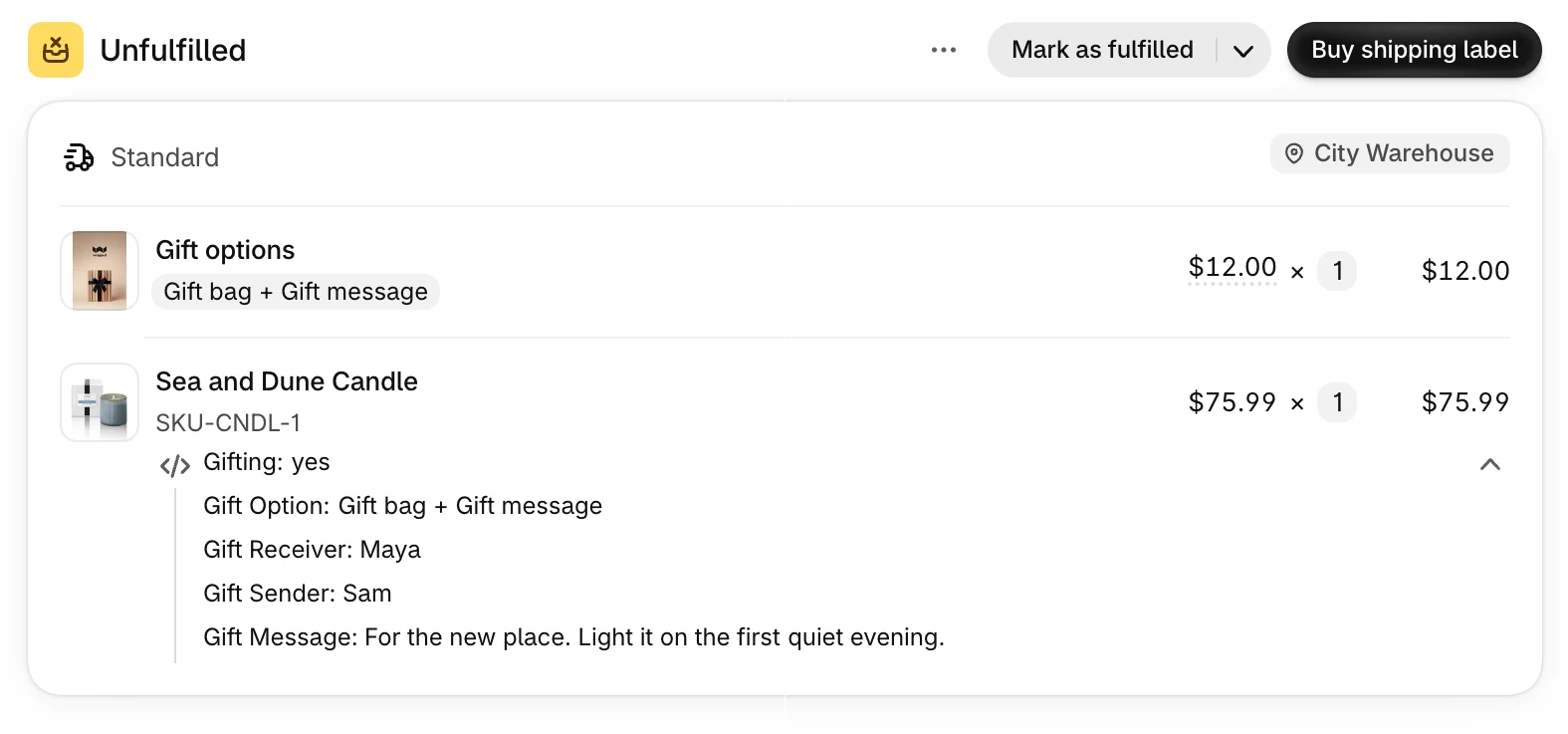
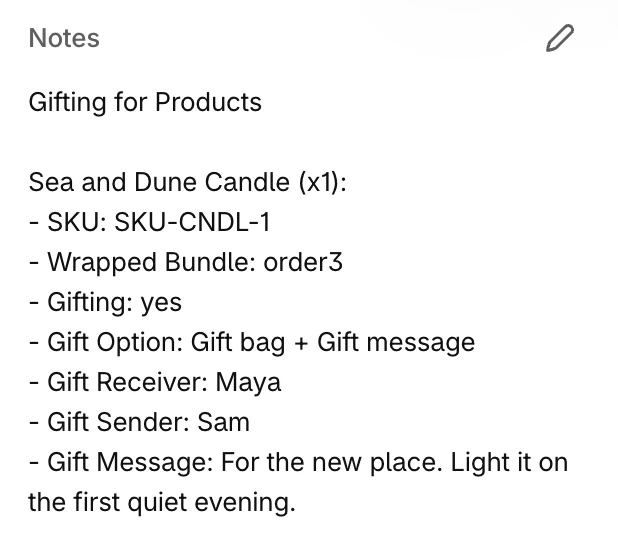
- For the packing slip. Gift option, To, From, and message sit on the gifted line, where your packing slip app reads. Shopify's own packing slip prints them once you add the snippet from the packing slip integration guide.
- For systems that read only the note. A gift summary in the order note lists each gifted item with its quantity, SKU, and message, below any note the customer left.
- For your 3PL's import. The same details sit on the order too. Rename them to match the import, or hide them from customers and keep them on the order.
- From Shopify Plus checkout. Gifts added at checkout arrive on the order the same way.
Gift orders are easy to find, and each gift sits with its item
Wrapped tags each gift order and ties each gift to the item it wraps.
- One tag for gift orders. Filter the orders list by 🎁 Wrapped, or use the tag in automations and reports. Rename it, or leave it blank to turn tagging off.
- Each gift matched to its item. With Gifting for Products, the gifted item and its gift option share a Wrapped Bundle ID on the order.
- Each gift is a product. It has its own price, inventory, and image, so it moves through your tools like any other line.
- Bundled or itemized. Bundled keeps the gift inside its product's line. Itemized gives it a line of its own. Either way, the order shows every line to pick.
- Per item or per order. Gifting for Products gives each item its own gift option. Gifting for Orders gives the whole order one option, one note, and one fee.
You decide what a gift message needs
You decide in the app where gifting is offered and what a gift message needs. Change both any time from the app.
Display rules- Required To, From, or message. Customers cannot save gift options until each required field is filled in.
- A character limit, and emoji on or off. Cap the gift message at a set number of characters. Turn emoji off if your printer or packing slips cannot show them.
- Gifting by delivery method. On Shopify Plus, the checkout Gift Block offers gifting on shipping only, store pickup only, or any delivery method. Customers who pick another method see a notice.
I really liked that the gift wrapping appears on the order with a code that specifies which item needs to be wrapped. That way theres no confusion on what item you need to wrap if there are multiple items.
What operations teams ask before turning gifting on
Can Shopify's packing slip print the gift message?
Yes, once you add a snippet to the packing slip template. Shopify's template reads the details on each line, not on the order, and the gift option, To, From, and message sit on the gifted line. The packing slip integration guide has the snippet. With Gifting for Orders, this needs a connected gift product.
Will a 3PL that reads only the order note get the gift details?
Yes. Turn on the order note summary, and Wrapped adds a gift summary to the order note: each gifted item with its quantity and SKU, and the gift message, sender, and receiver. It sits below any note the customer left, in a layout you can edit.
Can we rename or hide the gift fields?
Yes. Rename a field to match your 3PL's import, or hide it from customers while it stays on the order. Changes apply to orders placed after you save.
Can we change or turn off the gift order tag?
Yes. Gift orders are tagged 🎁 Wrapped. Rename the tag in each gift option's settings, or leave it blank to turn tagging off.
Does the gift show as its own line on the order?
In the cart and at checkout, a bundled gift sits inside its product's line and an itemized gift takes a line of its own. On the order, every gift is a line to pick and pack, with the gift option, To, From, and message on the item it wraps.
Can we keep gifting off store pickup orders?
Yes, in Shopify Plus checkout. The checkout Gift Block offers gifting on shipping only, store pickup only, or any delivery method. Customers who pick another method see that gift options are not available for it.
Gift orders your packing team reads at a glance
Rated 4.8 on the Shopify App Store. Every plan has every feature and a 7-day free trial. Place a test gift order and preview its packing slip before the first real one.